Absolutely Remove Start.funmoods.com Redirect Virus From Your Browser

Is your computer hijacked by Start.funmoods.com? How to get rid of it?

Start.funmoods.com (Start.funmoods Virus) is a new published dangerous browser hijacker, actually it is a fake search engine which is related to FunMoods Toolbar. This browser appeared and opens up as your home page even though google is supposed to. Start.funmoods is as nasty as Searchnu.com/421. It is a fraudulent site that with some Ads there, such as Meet Real Russian Women! Chat with Sexy Russian Women and women from some other countries. After miss clicking on the blinking button, you kinda start freaking out. Start.funmoods.com is a fake domain full of malicious Ads. You have been getting numerous redirects in google. AVG constantly gives cookie tracking warnings. They constantly repopulate in the cookie folder. They are the same cookies with different names constantly regenerating. Ntsf dirty file messages appear on reboot. You have scanned with malwarebytes, avg and adaware. None of these solve the problem. Typically, the URL for this link in a phishing email is a very long and involved address that’s actually a bit hard to read. The first part of the address might look legitimate, but the URL doesn’t stop there. If you follow the complete URL, it takes you not to the expected website, but to the phisher’s carefully constructed forgery. That is annoying that Start.funmoods.com redirect virus is easily to change your browser settings and control your search engine. How do you completely eliminate this Start.funmoods google redirect virus and avoid happening again? Well, The counterfeit website is where the final scam takes place.The primary defense against phishing scams is simple: Never click a link in an email message no matter how official it may look.  What you have to do is get the effective way here safely to delete Start.funmoods.com browser hijacker. Read the rest of this post »

Published by Tony Shepherd on March 28, 2012 10:16 am and last modified on November 9, 2012 10:46 am.
How to Manually Remove Windows Debug Center From XP,Vista,Win 7

How do i remove Fake Windows Debug Center without downloading anything?

Windows Debug Center is a new fake antivirus software with the old goals to mess up users computer. It is a a clone of well-known malicious rogue antispyware such as Windows Attacks Defender. Attackers access your system via some sort of backdoor and then steal important data, delete files and folders, or use your computer to initiate additional attacks on other computers, networks, or websites. Particularly malevolent attackers can even flood your system with data requests and emails, overloading your system until it crashes or goes offline. Once the rogue Windows Debug Center installed on a targeted computer, it immediately to scan the whole system then showing you with a couple of viruses, spyware, malware in a few minutes. It is amazing that this application just take a little while to scan your system then all were complete. But normal antispyware will take several hours to do a full scan in your system. So you must understand that what Windows Debug Center virus told you are false. This type of attack typically takes place over the Internet, with the operation executed by a remote computer or a master computer controlling a network of hijacked zombie computers. In most instances, computer attacks are directed at large computer networks or websites, typically by an individual with a grudge against the organization attacked. This spyware must be eliminated as quickly as possible, if you don’t know how to deal with this rogue application but want to get the issues fixed completely, you are strongly recommended to get rid of Windows Debug Center with the support of PC experts who are 24/7 online. To safely and completely clean this nasty virus, ensure your PC back to normal again. Why not take an action now? Read the rest of this post »

Published by Tony Shepherd on March 28, 2012 7:18 am and last modified on November 9, 2012 10:41 am.

Trying To Get Rid Of Searchnu.com/421 Redirect Virus But Failed?

Is Your Computer Infected With www.searchnu.com/421? How Do You Remove It?

Searchnu.com/421 (Searchnu.com/406, Searchnu.com/413) is a dangerous browser hijacker, actually it is created darkminded ad-writers or hackers. It is a fraudulent site that has been found related to fake thing and google redirect virus. This virus is everywhere, throughout the network. Some other day, you were surfing reddit, when i seemed to miss click a link in a subreddit. After miss clicking on it redirected you to some porn site in which you then instantly closed the browser. Upon reopening the browser a notification popped up on the google chrome wrench stating something along the lines of ” Something has tried to change your search engine it was reported to google,” something along those lines and it happened for awhile after id open chrome. So you kinda start freaking out that maybe you’ve been hijacked so you ran malwarebytes, nothing showed, tdsskiller, nothing showed, ESET online scanner, and nothing showed. That is annoying that the searchnu.com/421 redirect virus is so stubborn. You also noticed superantispyware wouldn’t update but everything else would you then scanned with that nothing popped up, and last spybot search and destroy which you would run but it seems the first time you run it on a cold boot it crashes around virtumonde.dll. But fortunately you found this post, please be sure that you can get the most useful help to delete Searchnu.com/421 virus completely. Read the rest of this post »

Published by Tony Shepherd on March 27, 2012 8:18 am and last modified on November 9, 2012 10:35 am.

How to Remove Windows Software Saver Virus Manually And Completely

How do i remove Fake Software Saver without downloading anything?

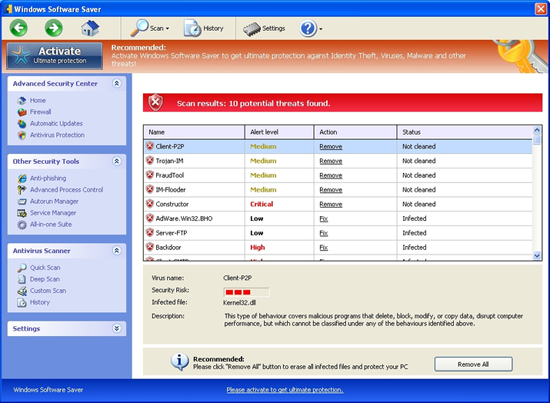
Windows Software Saver is a dangerous fake thing, it is not a legit software saver. It is a a clone of well-known malicious rogue antispyware such as Windows Performance Catalyst. In general, whenever your computer starts acting different from normal, it’s possible that a virus has infected your system. So when you found there was a malicious windows popped up and it looked like a antivirus. And it started to scan your system. Once the fake security program called Windows Software Saver installed on a targeted computer, it will first scan the whole system automatically, next telling you your computer must be damaged if you don’t clean out all the threats it detected. After the scanning, there will be a huge number of fake infections displaying on the screen. But as you know your computer mustn’t have so much viruses since you hadn’t visited any malicious sites. You might discover that certain files have gone missing from your hard disk or that your system is acting sluggish—or failing to start at all. Do not leave it in the computer, because this malware is able to change system settings, block system tasks and disable most programs on the infected computer. How big is the Windows Software Saver virus? Identity theft can be the result of online negligence (responding to phishing emails or being the victim of a computer virus) or real-world theft (having your wallet stolen or credit card statements pilfered from your trash). However it’s accomplished, the identity thief obtains one or more of your valuable numbers, and then uses those numbers to access things that are yours—typically, your money. This spyware must be eliminate as soon as possible, if you have spent the whole day to search online to find removal guides about this rogue application but just found out many of them are useless and it is a waste of time. So to safely and completely clean this nasty virus, make sure you can get your PC back to normal. You need to manually get rid of Windows Software Saver at a quick time.

Windows Software Saver ScreenShot

Learn more how to get rid of the malware permanently

Read the rest of this post »

Published by Tony Shepherd on March 25, 2012 3:30 pm and last modified on November 9, 2012 10:32 am.

Need Tips To Get Rid Of Windows Health Keeper Virus From Windows XP, Vista or Win 7?

Failed to remove Windows Health Keeper fake alert?

Windows Health Keeper is a fake antispyware tool. WindowsHealthKeeper looks like an antivirus software, but it can’t do anything to fix computer security problems and reduce risk. It is a rogue program that always can be reported as threat by other real antivirus software. And this fake Health Keeper always shows you that many of your programs are infected or at risks. When users click fix, it can do nothing, but there is a window name WindowsHealthKeeper pops up and asking you buy their program. This is a typical method of hacker to scar users, in order to make users spend money to fix their issues, but after you have finished the payment, nothing could be changed, the annoying fake alert still pops up and seems like laughing at users. Of course, users can do nothing until Windows Health Keeper is removed. Most of programs would be warning as a risk program. Please don’t do anything about the payment, you will lost your money and nothing can be fixed if you have done that. We are sure that you may have tried lots of antivirus programs that you usually use or you can trust to remove this rogue program but nothing worked. Not every antivirus program can fix every risk because they are not god. Sometimes some antivirus can remove Windows Health Keeper by updating their functions, but the spyware blocks it again, that is very funny. Because the scareware creator know how to make user’s antivirus program works abnormally, so users still at the risks. So, is there no way to get rid of Windows Health Keeper? The answer is NO. We will show you the guide here! Let’s rock. Read the rest of this post »

Published by Tony Shepherd on March 18, 2012 1:43 pm and last modified on November 9, 2012 10:11 am.

How to Initialize MySQL under Windows environment?

What is MySQL? How to Initialize the MySQL?

MySQL is a small relational database management system that developed by MySQL AB company which is based in Sweden. SQL relational database data is stored in the database objects called tables, rather than all data on a large warehouse. This increases the speed and flexibility.

In the Linux environment, you cannot directly start the service also after installed mysql, you must first initialize the database. Initialization work including:

After doing the analysis of mysql_install_db.sh under the Linux environment, you need to initialize the database, and the command to initialize the database is the following lines:

mysql_install_db.sh

??#?Pipe?mysql_system_tables.sql?to?”mysqld?–bootstrap”

??s_echo?”Installing?MySQL?system?tables…”

??if?{?echo?”use?mysql;”;?cat?$create_system_tables?$fill_system_tables;?}?|?eval?”$filter_cmd_line”?|?$mysqld_install_cmd_line?>?/dev/null

??then

??s_echo?”OK”

??s_echo?”Filling?help?tables…”

??#?Pipe?fill_help_tables.sql?to?”mysqld?–bootstrap”

??if?{?echo?”use?mysql;”;?cat?$fill_help_tables;?}?|?$mysqld_install_cmd_line?>?/dev/null

??then

??s_echo?”OK”

Where:

$ create_system_tables, $ fill_system_tables and $ fill_help_tables is respectively to create the system database, initialize the data in the system database, and initialize the help data. Read the rest of this post »

Published by Tony Shepherd on March 12, 2012 8:50 am and last modified on May 30, 2013 7:36 am.

How to remove Lessearch.net redirect virus completely – Lessearch virus removal help

Are you familiar with www.lessearch.net? How do you remove it?

Lessearch.net(www.lessearch.net) is not a legitimate but a fake web site, actually it is a browser hijacker. Lessearch.net is a fraudulent site that has been found related to fake thing. Lessearch.net is a google redirect virus. So, what exactly does the Lessearch.net virus do? It does not infect your system and give you some fake information about it. When users try to enter some links they want Lessearch.net Google Redirect virus can simply ‘send’ them to another sites, such as the Lessearch.net false web address or other malicious sites. Once your computer is infected with Lessearch.net, then you have been getting numerous redirects in google. Computer user also have svchost.exe taking up all the resources and restarting after ending process. Computer runs very slow. The victims of the virus ran tdsskill and it has helped the svchost.exe problem. AVG constantly gives cookie tracking warnings. They constantly repopulate in the cookie folder. They are the same cookies with different names constantly regenerating. None of these solve the problem. If you have to do tax reports through internet this weekend on this machine. That is annoying. But luckily you find this guide, please be sure that you will get the most useful help from the internet to delete Lessearch.net virus completely. Read the rest of this post »

Published by Tony Shepherd on March 9, 2012 5:29 pm and last modified on March 29, 2012 2:46 pm.

Safely remove System-check.de virus and get back all icons hiden by System check Virus

Are you familiar with System-check.de? How do you remove it?

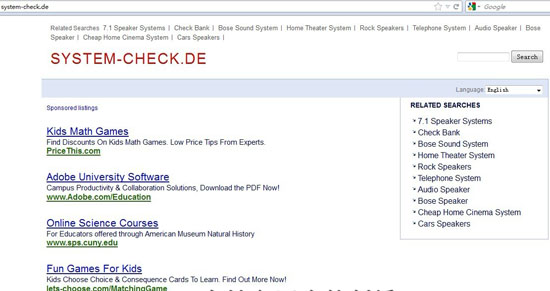
System-check.de(www.system-check.de) is not a legitimate but a fake disk defragger site. System-check.de is a fraudulent site that has been found related to fake optimization program known as System Check. It came out last night and System check with PC Performance & Stability analysis report warnig alert. Once the fake hard failure software installed on a targeted computer, it will first scan the whole system automatically and tells  there are critical system errors with the system drive, RAM memory, system registry. Users can not control the keyboard and mouse to stop this for system check virus hide all your icons on the desktop, and there are nothing on start menu, all programs have gone. And there is only System Check scam alert or Windows Delayed Write Failed fake warning. After the scanning, there will be a huge number of fake infections displaying on the screen, such as 14 errors detected! Hard drive and memory errors are detected on your PC.Please perform the requested action. Actually it is not true, what is had told you just want to scare you to pay for its full version of system check (www.system-check.de) to get all errors fixed. What is more, nothing will help after you paid for the system check virus, system check scam.  Do not leave it in the computer, because System-check.de is able to change system settings, block system tasks and disable most programs on the infected computer.  And when you find this guide, please be sure that you will get the most useful help from the internet to delete System-check.de(www.system-check.de) virus(System check virus).

 System-check.de ScreenShot

Learn more how to get rid of System-check.de malware and fake System Check virus permanently Read the rest of this post »

Published by Tony Shepherd on March 6, 2012 9:08 am and last modified on March 29, 2012 1:59 pm.

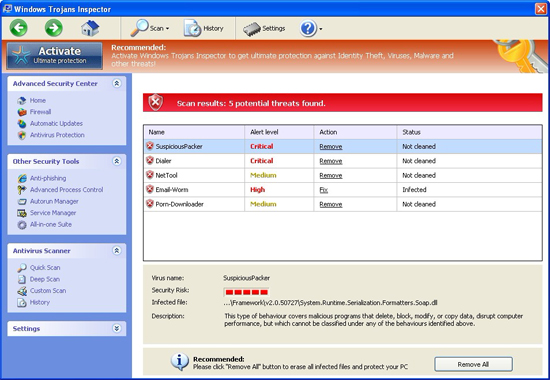
How to remove Windows Trojans Inspector Virus Completely

Do you know how to uninstall Windows fake alert?

Windows Trojans Inspector is a fake software and this is also a tricky rogue ware. Windows Attacks Defender is a a clone of well-known malicious rogue antispyware such as Windows Performance Catalyst. It looks like a professional and trustworthy security software, fake Trojans Inspector always warning that your computer infected with many viruses, but it finally get a purchase page that asking you to buy their product. And you always can’t get access your programs, sites even mails. It means that Windows Trojans Inspector is not security software, it is a fake security software. Once you installed WindowsTrojansInspector, it starts scanning and shows you there are many infections on your computer, this malware most often hidden on the computer. Windows Trojans Inspector virus can copy itself to everywhere then delete the source. It can also infected your driver files, leads it can be run when the computer starting up. Windows Trojans Inspector fake thing also hacked websites using Trojans and online scanners, the scanner that perform a fake scan of your computer for mislead you, the spyware reports hasn’t anything you can trust, all the infected is fake. You should get rid of Windows rogue application as soon as possible. What’s more, this bogus will prevent you from scanning like most of the roguesofware. Still, it still there although you have paid for it to get the so called legit activate code or registry key to register the program. Then you were stuck by the Windows Trojans Inspector malware, and a couple of victioms get their computer infected with such annoying thing on the internet, such as when they were on facebook, watching movies on youtube, or porn sites. Since WindowsTrojansInspector is  SCAM so to safely and completely clean it out of your computer, making  your PC back to normal again. You need to use this effective way to absolutely uninstall Windows Trojans Inspector warning alert.

Windows Trojans Inspector ScreenShot

Learn more how to get rid of Windows Trojans Inspector malware permanently

Read the rest of this post »

Published by Tony Shepherd on March 4, 2012 6:30 pm and last modified on March 29, 2012 2:33 pm.

Manually remove Windows Attacks Defender Virus – get rid of Windows Attacks Defender scam

How do i remove Windows AttacksDefender?

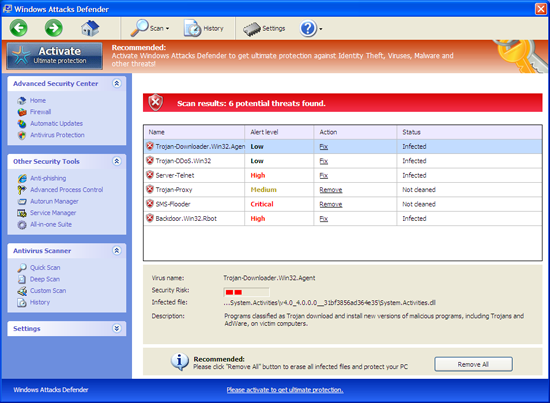
Windows Attacks Defender is a fake software and this is also a tricky rogue ware. It is a a clone of well-known malicious rogue antispyware such as Windows Performance Catalyst. It just came out last night and spread in an amazing speed on the internet. It is updated from the last version so all the fake things. Once the fake security program like Windows Attacks Defender installed on a targeted computer, it will first scan the whole system automatically. Users will lose controlling  the keyboard and mouse to stop this. After the scanning, there will be a huge number of fake infections displaying on the screen. But as you know your computer mustn’t have so much viruses since you hadn’t visited any malicious sites. Yes, what it tells are  not legitimate, they are all nonexistent and fabricated by the designers to cheat computer users all around the world. You should never trust this malicious application. Windows Attacks Defender has been spreading all over the world with a great power at present time. Do not leave it in the computer, because the malware is able to change system settings, block system tasks and disable most programs on the infected computer. WindowsAttacksDefender will make your computer slow down, running like a snail. Also, you can not use the computer for work or other things with the fake alert popping up. What’s more, WindowsAttacksDefender will prevent you from scanning with any tools.  Still, after search online you may find out there are numerous online guides about this malware removal but many of them are useless and just a waste of time. So to safely and completely clean Windows Attacks Defender, make sure you can get your PC back to normal. You need to kill it once WindowsAttacksDefender is detected.

Windows Attacks Defender ScreenShot

Learn more how to get rid of WindowsAttacksDefender malware permanently

Read the rest of this post »

Published by Tony Shepherd on March 3, 2012 9:05 am and last modified on March 29, 2012 2:30 pm.

Subscribe

Latest How-to Guides

Category

YooSecurity Virus/Malware Removal Service

YooSecurity Event

Problems with your PC, Mac or mobile device?

Live Chat Now

As Seen On