
Your PC is blocked by Australian Federal Police AFP Virus (Ukash Scam) and have to pay 100 or 300 dollars to unlock it?
Your browser has been locked on Android Phone/Tablet? How to get the AFP virus off my screen?
Australian Federal Police AFP Virus (also known as AFP Ukash virus) is the new variant of the infamous Ukash virus family, while Ukash is a licensed and regulated issuer of electronic money and is a legal way you can use to make payments online or offline. It works very similarly like the previous ransomware FBI System Failure Virus, FBI virus, West Yorkshire Police Ukash virus, RCMP Ukash Virus, PRS for Music Ukash virus and Metropolitan Police Ukash (PCEU). The Ukash virus family has been aggressively attacking users computers with loads of new variants. The designs of Ukash virus are so intuitive and convincing that most of average computer users are thinking they might have infringed certain laws like illegally copying music and watching adult contents online, and then pay the fines asked by the fake Metropolitan Police to unlock your computer. My computer had been blocked by AFP and they want me to pay moneypak $100 AUD for viewing pornography, what do i do? Australian Federal Police AFP Virus (ukash scam) pops up a lockup notice saying you have pay the $200 fines to unlock it before you can continue to use your computer on a daily basis. All the alerts, wordings, Metropolitan Police badge and other elements on the lockup are made purposely to convince that you are violating the laws and must pay the $200 fines now to unlock your computer via Epay Ukash, Paysafecard or other payments online. And sometimes you got AFP files locked on browser on Mac? Well, it infects Mac computers as well. The Mac user stated that he seems to have contracted the AFP Ukash virus ICSPA scam on his Mac Book pro as there is a message popping up from AFP for illegal internet usage, when AFP browser locked screen or locked IP alert displays, how to unlock browser from AFP on Mac? If your browser has been locked by AFP virus on Mac and it asks for Ukash: $300 AUD (one voucher code) to unlock your computer, how to unlock Australian Federal Police AFP Virus screen without paying the fine? If you don’t want to lose money, please don’t pay the fake AFP Ukash virus and follow the instructions below to remove it completely. Unfortunately, even if you try to reboot your computer and get in safe mode with networking, the ukash virus screen is still there and it block your screen immediately. You can’t do anything on your computer but with the screen fully locked by Australian Federal Police AFP Virus Ukash Scam. So the only best way to save your computer is to manually kill this AFP virus and unlock your laptop/desktop with expertise.
The AFP Ukash virus asking for $100 or $300 AUD to unlock PC is a cyber crime sponsored by online third-parties to scam innocent PC users. It takes advantages of the authorities of the Australian Federal Police and scares PC users mostly from Australia to pay $100 or $300 AUD via Ukash in order to unlock PC. Otherwise, victims of the AFP virus are threatened that further criminal cases can be automatically initiated against them if they refuse to pay or cannot make the payment within limited time period. What will happen if the time elapses? Can more damage be done to PC after 24 or 48 hours? Users will find their machines remain blocked by the AFP Ukash virus when the time passed. PC won’t be unlocked from this AFP virus even if the payment is entered. Hence, the Australian Federal Police AFP virus is a big Ukash scam and you shouldn’t trust a word it says. Today, this long-lasting AFP virus can not only lock up Windows machines, but affect browsers on Mac books. It’s never terminated permanently but still activated on the Internet. As time goes by, AFP Ukash virus can change or upgrade to different variants to attack more computer users. The AFP virus block screen can also return on PCs that were infected before if users don’t behave in manners on the Internet or there are still some remaining items on the machines. Hence, an overall complete removal must be performed correctly to unblock PC from AFP Ukash virus safely.
Recently, this fake AFP virus scam attacks mobile devices (mobile phone or mobile tablet) seriously, the same as many PC victims got the virus the mobile users are hacked by clicking on a link their friends sent them and it went on porn and their mobile phones or tablets are blocked and they couldn’t go on the device at all. It says you have to buy a I tune card, when you got the AFP block virus Pop up on Phone and you were wondering how to make sure the virus was off of your phone as the browser or screen on phone or tablet got message saying you visited porn site and wants a pay pal payment. Can you help take virus off my device put on by AFP site scams the forbidden pornographic sites? Learn more below.
To save your computer or mobile phone/tablet, Live Chat with YooSecurity Expert Now. You can follow the manual removal guide below to get your problem fixed. (For advanced computer users)

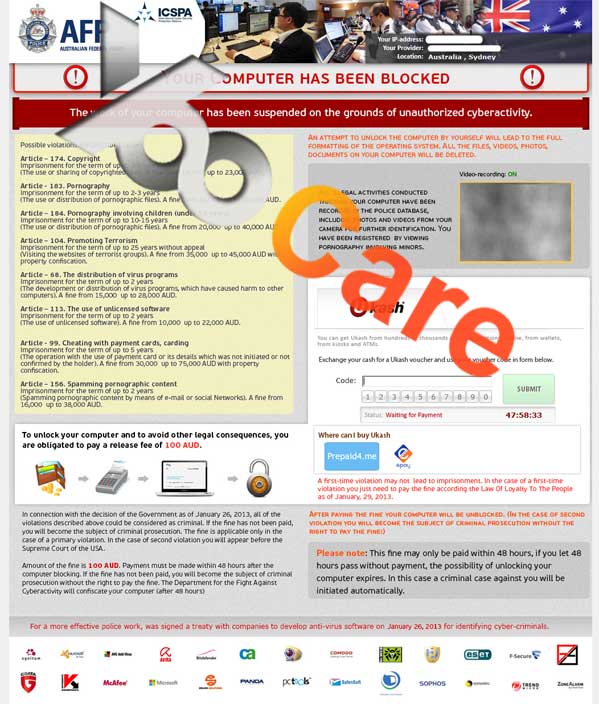
ScreenShot of Australian Federal Police Virus – Fake AFP Warning Virus
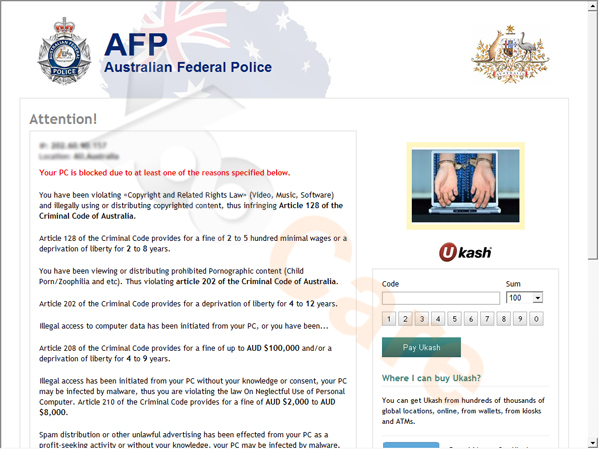
New ScreenShot of AFP Ukash Virus
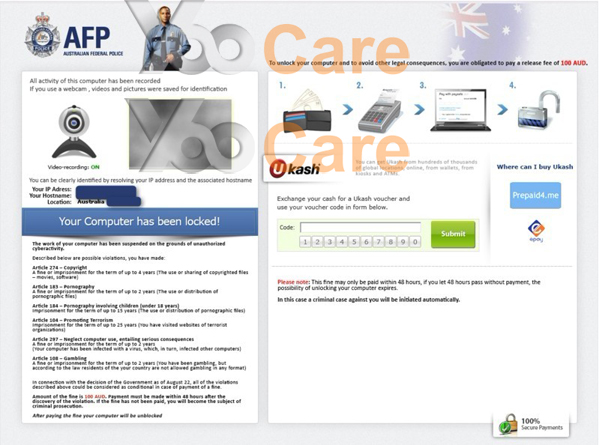
AFP Virus – Your computer has been locked!
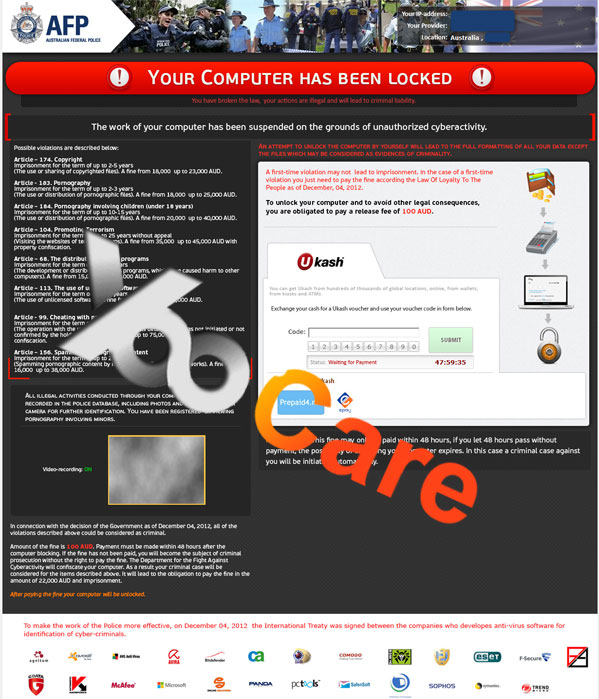
Latest AFP Virus (Ukash Scam) locked computer – Australian Federal Police AFP – your computer is locked for the following reasons, please pay $100 to unlock
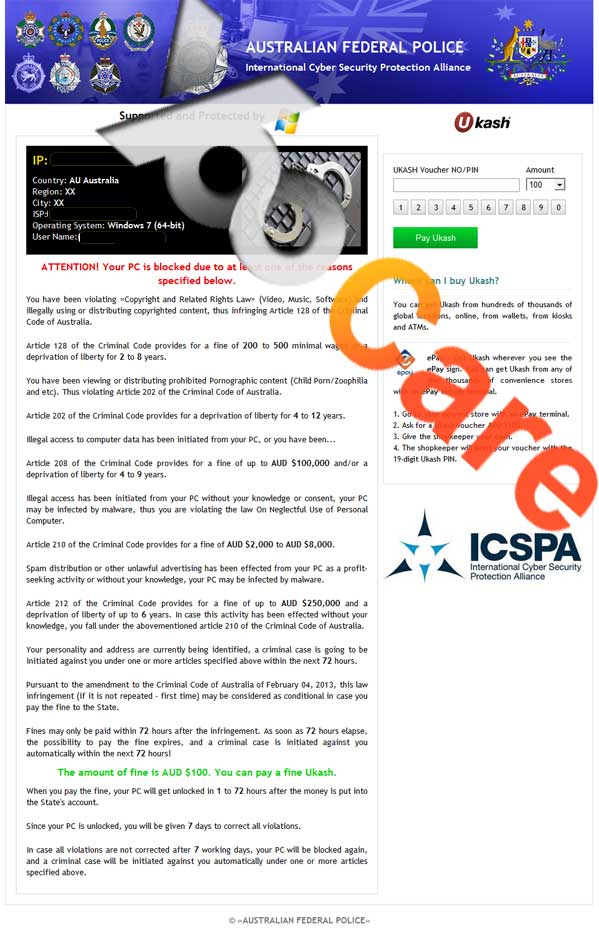
New Screen of Australian Federal Police (AFP) Virus (a.k.a AFP virus) Pay $100 AUD Fine
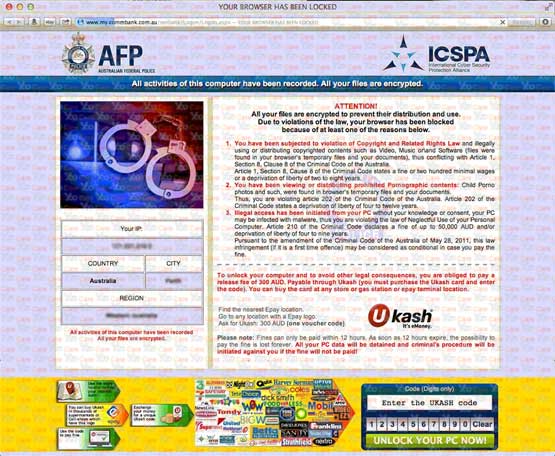
New Version of AFP Virus Locked Browser On Mac Book
How Did I Get Australian Federal Police AFP Virus (Ukash Scam) As I Have Anti-virus Software Installed On My PC? Did this AFP virus steal my personal information?
1. Most of people get affected by the AFP virus by browsing malicious webpages, the fake police virus can get into their computers and make changes in the system settings, browser settings, and Windows Registry settings. Since all related files are very important, if something goes wrong with them, it’s easy to get infected with Australian Federal Police Malware on the target computer.
2. Peer to peer file sharing over the connected network will cause various kinds of viruses. Files such as freewares, documents, videos or audios, etc over the peer to peer connection on the internet can be the possible cause of Australian Federal Police (AFP) Virus infection.
3. PC users install various kinds of third party security programs such as firewalls, antivirus software, etc to remove all possible infections from their systems, but unfortunately, they forget to update them regularly, and the programs get outdated, that is why this virus can attack computer without any trouble.
4. Downloading free-wares or other data from untrusted links can lead to Australian Federal Police Malware Virus as well as most of the malware infections.
Symptoms or Harmfulness of Australian Federal Police (AFP) Virus
What can Ukash Australian Federal Police Virus Scam do on my computer? It is AFP blocking my internet send money thru Ukash scam.
Is your computer screen completely covered by the AFP Virus when you are using the Internet just as what you did usually before? Really frightened by this scaring thing having no idea whether it’s a legal notice from real Federal police department or just a scam handled by devil people? Tried a variety of scanning with malware removal software but this scam malware still comes up every time? Reading this post will help you find out the truth about Australian Federal Police malware and the effective solution to get it out of your computer permanently. Fake Australian Federal Police Virus has been defined as a wicked scam malware that recently exploding and spreading between millions of personal computers all over the world through Internet. This scam malware is quite similar to the FBI green dot moneypak virus from USA an the Metropolitan Police Ukash Virus from United Kingdom as they’re showing exactly the same symptoms on infected computers. Once get in the infected computer, the first thing that Australian Federal Police (AFP) Virus will do is to have your computer locked so that you’re not able to do anything with it but can only read the content of the message from the screen which seems to be a legal notice saying your online activities has been detected to violate the federal laws thus you will have a pay a fine to the federal department via Ukash online payment otherwise you will probably have a lawsuit case then be put in jail. Many timid person may believe this is true and pay the fine which is exactly what the hackers want us to do, but the only result can be the loss of money with your computer still being locked at the end. Therefore please don’t be such a fool to trust in this scam malware when the first right thing to do is to get it removed from your computer. Up to now, there is no anti-virus can handle this latest scam malware therefore the only effective solution is manual removal. Next please look below the best way to remove AFP virus safely and completely from your PC.
How to Prevent Your Mobile Devices From Locking By AFP Ukash Scam?
1). Watch out for your battery. A device draining easily is a red flag for you. This could indicate that there’s a malware or types of virus which is infecting your device. Check from time to time. That’s the best way of dealing with the problem.
2). Use passwords or pins which are strong enough. If your pattern is so easy, then others can access it. You just have to be careful. Who knows someone might be jealous on you? It will always be smart to be cautious. You can use application to help you be secured like the Lock Pro folder.
3). Un-root your device if you happened to root them. That will make it more secured.
Best Way to Remove Australian Federal Police Ukash Malware Efficiently
Hi my laptop is showing warning of federal police. Its shows your computer has been locked. Sometimes users got Blue Screen comes up saying my PC has been locked due to looking a pornographic material message. AFP Virus (Ukash Scam) comes from the dangerous group of ransomwares which is a fake Australian police Ukash scam designed to lock your computer. Recently, many PC users in Australia were attacked by this malicious fake. Besides, English-speaking Countries like England, New Zealand, Australian, and even United States are became the victim country of Ukash virus. It means that the virus has spread worldwide. Once installed and launched Australian Federal Police Malware Virus on your PC, it will make a scary fake alert stating that you are visiting illegal websites and Australia police for watching porn and terroristic material asked you to pay 100 AUD via Ukash on the unlock code. In fact, that is a scam. Since the Australian Federal Police (AFP) Virus can block you even if you boot your computer in safe mode with networking, you have to contact an expert to deal with it. YooCare/YooSecurity provides the most professional online PC service. YooCare/YooSecurity experts can plan out a solution to access your computer in safe mode with networking at first. When it’s possible to do that, their experts will do as follows:
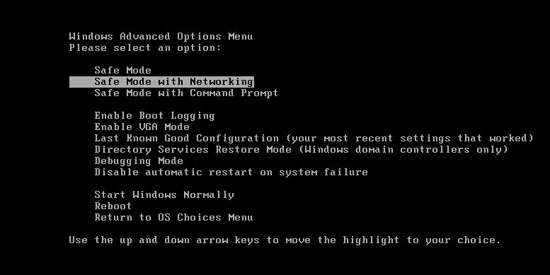
Step A: Restart computer in safe mode with networking. To do this, just need to press F8 key before the system is started like this:
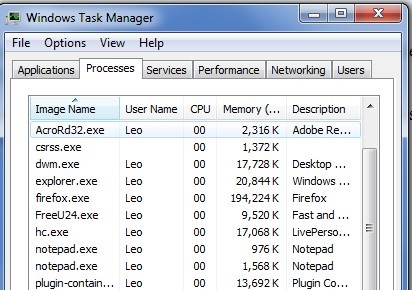
Step B: Press Ctrl+Alt+Del keys to open the Task manager to stop the progress of Australian Federal Police Malware. Because the name will be changed fast, it will be show with different name.
Step C: Delete all the files related to Australian Federal Police Ukash Malware
Step D: Delete AFP Virus register entries created in computer system.
For Mac book pro:
This AFP Ukash virus will mainly attack the Safari as well as Internet Explorer, Google Chrome or Mozilla Firefox browsers on Mac machines. Once it’s attacked, Safari will be blocked by this Australian Federal Police virus block page and you won’t be able to leave the page. In this case, please click on the Search icon (which looks like a magnifier) on top right corner of Safari browser, type in: Safari to re-open a new blank tab on the browser without this Ukash virus block page:

By the way: Woke up to the AFP virus locked screen saying to pay 100 dollars within 72 hours? I don’t think it’s legitimate or is it? It is fake. Manually remove Australian Federal Police AFP Virus (Ukash Scam) is a rather difficult work, if you are not a professional computer expert. We recommend you to get YooCare online service 24/7 in time. This is the real fastest and safe way to remove it.
Video Guide to Remove Australian Federal Police (AFP) Virus Ukash Scam Manually
Alternatively, you can view this AFP Virus scam removal video guide directly on our website.
How to restart your android phone/tablet to safe mode once it has been blocked by the AFP virus?
Hello, I have a case were my phone was locked. It says the AFP has a hold of it and I am required to pay a $100 AUD penalty? I was going to pay it but I am confused. Downloaded a porn video and my phone got locked by government. I was online on my phone and this AFP warning pops up telling me i own them a fine. How to get rid of AFP virus on phone? You need to put your cell phone to safe mode before removing the virus.
Note: “Safe Mode” on Phone starts up without loading any third-party add-ons and different devices have different ways to access safe mode.
For Samsung Galaxy S6 S5 S4: 1. Power down. 2. Turn on and repeatedly tap the soft-button for “Menu.”
For Samsung Galaxy S3 and others: 1. Power down. 2. Turn on, then press and hold Volume Down (Galaxy S3 and others), Volume Up (HTC One and others), or Volume Down and Volume Up together (various Motorola devices) when the vendor’s logo appears.
For Tablet: Power it off, and then power it on. During startup and when you see the Samsung Logo screen, press and hold the Volume Down key until you can see safe mode writing below the screen at the left hand angle of the screen.
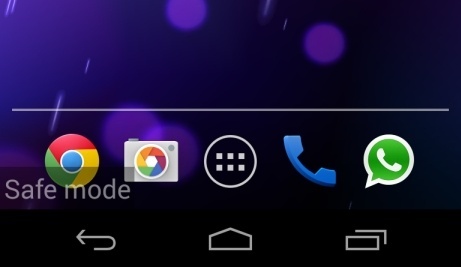
Now you have put your mobile device into safe to remove the virus away, but to avoid damaging your mobile by yourself, you are recommended to contact an expert online for further removal.
Summary:
Struggled with Australian Federal Police AFP Virus (Ukash Scam) that with kangaroo and peafowl icons on the right top side? One of the victims said:” a hacker placed this horrible virus on my computer, and now its unusable. One of my laptop is blocked with a Ukash virus how do i get it off? My other computer has been “locked” by an AFP warning claiming that I have broken copyright laws or viewed illegal pornography (neither of which have I done). I cannot even boot up Windows. It mentions something about a Ukash payment method for the “fines” that I owe. What can I do to remove this from a computer I cannot even boot the operating system on? I am having problem with my PC it say I have to pay $100 to AFP Australia does it right or fake and how do I get rid of this? Another victim said:”I have just discovered Australian Federal Police (AFP) Virus and it just has an Australian Federal Police with Ukash pay option, when i reboot my computer and tried to get in safe mode with networking to remove it but on my computer it went straight to Ukash screen on full screen. AFP your computer has been locked Trojan, what to do when its says your computer is blocked by Australian police virus? I even went on Youtube and other people are having the same problem, What should i do? How do i unlock my laptop from phoney Australian Federal Police warning virus scam?
Apparently, lots of computer users are made victims to this AFP Ukash virus. Even though the Ukash virus block message looks quite legit and seems to be from the real Australian Federal Police, it’s in fact a cyber crime performed by cyber criminals to scam average PC users around Australia. It’s main purpose is to get as many victims to pay $100 or $300 AUD to unlock PC as possible. Once the payment is made, the AFP virus will leave victims’ machines blocked by the unwanted message. Even though under several cases the PCs do get unlocked after the money is sent, it doesn’t mean that the AFP Ukash virus is removed from system. The unpleasant virus page can pop up again blocking the computer screen and displaying scams for a second round. To completely unlock computer from AFP Ukash virus scam malware, manual removal is the best and most efficient solution.
Special tips: Spending a lot of time fixing your computer/Mac book/Android phone/tablet with no success? Contact experts now to unlock your computer/Mac book/Android phone and remove Australian Federal Police AFP Virus (Ukash Scam) safely and completely.

Published by Tony Shepherd & last updated on March 2, 2018 5:11 am










Leave a Reply
You must be logged in to post a comment.