
What is Ukash virus scam? Have you got a full screen displaying a message warning you that your phone or your computer is blocked due to your illegal activities online? It locked the screen saying you were looking child pornography and you have to pay the fine from 100 pounds to 200 pounds. It states it’s legit and is from the government office and wants you to send 100 euros by using Ukash. How did you get Microsoft Windows Ukash virus blocked PC? And Why you’ve had your mac book block by a virus asking for ?100 to unlock it? Your android phone or tablet blocked up for looking at porn? You got hit when you were watching porn on the Internet? The victim said:”My MacBook Pro has just been hit by what I’ve looked up to be a Ukash virus saying i am watching illegal porn and have to pay 100 pounds or face serious criminal charges. My screen is blocked. What do I do? How can I unlock my computer and get rid of the fake Ukash scam virus? How to get out of Ukash screen to see task manager?” My mac book has been blocked by a virus asking for £100, How can I get rid of it? What if a police page pops up saying i’m arrested? Hi there I think my Phone has been scammed and need some help to remove this they are asking me to pay ?100 to Ukash or paysafe card, i got this UKash virus on my mobile device when I was watching porn on my iPod and Samsung galaxy phone and I’ve got a message saying unless I pay ?100 all data etc will be wiped. Does Ukash virus hackers watch you what you were watching? What can I do?Learn more details about this malware and get the best solution here to fix the trouble completely.
How to Remove Ukash Virus Scam That Blocked PC/Mac Book/Mobile Device and Asked For Payment 100 Pounds or Euros?
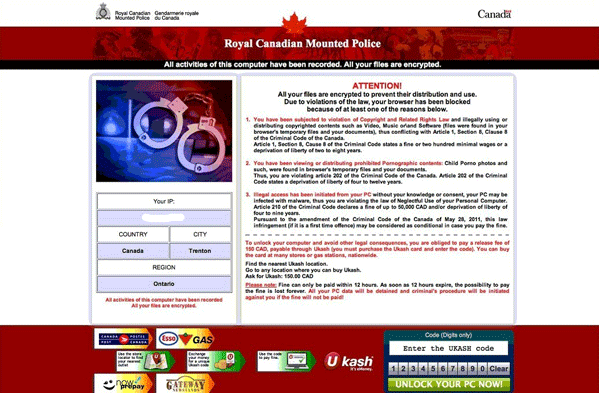
Ukash Virus is new created ransom-ware which has been infecting many computers, Mac book pros or mobile devices. It has many other versions such as the Metropolitan Police Ukash virus, the FBI moneypak virus and Canadian Security Intelligence Service Virus (CSIS Ukash Virus). When people get this ransom-ware infection, their computers will be locked by full screen messages which seem to be released by authorities. The warning threatens computer users that they have violated many laws of local government, especially laws of cyber activities. This Ukash virus message may confuse you because you have always behaved in manners on the Internet. You may ask” did I do something wrong?” or “What have I done against the law?” Don’t be afraid of it. This is just a threatening warning of a scam malware. If unfortunately, you are getting this warning information, your computer is now under the attack of scam malware. This Ukash Virus malware has an interface with many languages so that it can trick more people into paying the requested fees to the hackers behind the virus. Do not believe such block pages even when there is a logo of the national police service on the messages. The real government department will never send such warning messages on the Internet to block you from accessing your own PCs. The Ukash virus is often linked to the Royal Canadian Mounted Police Ukash ransom, which displays a notification message on the computer screen stating that it is coming from the International Cyber Security Protection Alliance and notifies the users that their computers have been locked because they have been illegally used in SPAM email campaigns, distribution of pornographic material, and violating copyright laws.
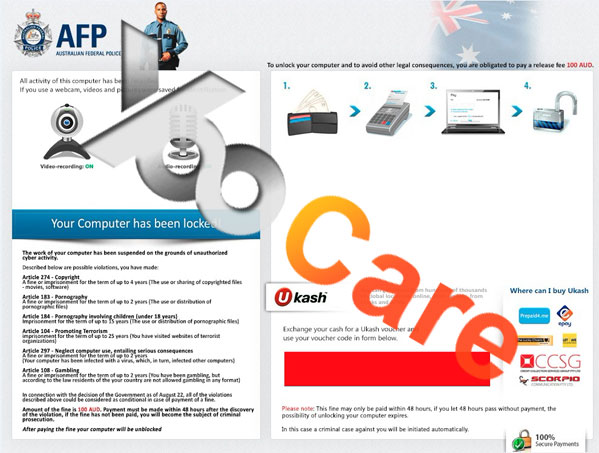
Have your computer covered with a screen claiming you have to pay $100, £100 or €100 to unlock it and to regain the full privileges on it? Do not fall for such cyber scams. This Ukash virus has so many different variants including the FBI Cybercrime Division virus, Australian Federal Police virus Ukash scam and Politie Federal Computer Crime Unit Virus. Seeing the screen of your computer is preoccupied by this Ukash notification, you should realize that you are now facing a huge and world-wild cyber scam instead of some authorities’ charges. The Ukash virus is a ransomware attack that blocks the computers form regular operation and displays a message stating that a fine of $100 (or similar amount in different currencies) must be immediately paid for several violations, including participating is SPAM emailing, the distribution of pornographic material, and for copyright violations due to similar online activities. It states that if the requested fine is sent quickly within the limited time period, the authorities will drop all pending charges and there will not be any additional fines as well. The fact is, this virus is actually sponsored by cyber criminals to extort money from innocent PC users. They attempt to put the pressures on and force victims to pay to get their PCs unlocked as well as save themselves out of further illegal troubles. The Ukash virus gets its name because of the payment method in which the hackers require, and that is the Ukash voucher. This helps the computer hackers behind this virus remain anonymous and it also prevents the victims from trying to recover the money once they realize that they have been scammed. The other effective way of spreading the Ukash virus is to use torrent and file sharing websites. The hackers will include the virus along with popular downloads. When the user downloads the files they will be asked to install them, and not only will they be installing the files that they planned on downloading, but there is a surprise virus being installed as well without their consent.
The Ukash Virus is a variant of Ukash ransomware and much similar to Gema and GVU from Germany, Sacem from France and Buma Stemra from the Netherlands. In fact, this virus is attacking many countries and areas with different languages and interfaces. Once such virus is installed on your computer, it will block almost all the functions of Windows system including Windows 7, Windows XP, Windows Vista and Windows 8. And lately, Mac book users are also being targeted by such similar Ukash virus attacks. Once installed, the virus will lock a computer up with a fake warning message preventing the computer user from accessing the machine even if the user has manually shut down the computer and restarted it in safe mode. The warning message demands that a fine of $100 must be paid right away or the user will face additional monetary fines as well as criminal charges later on. There are several different versions of the Ukash scam, but all of them will present similar warning messages with same basic information. They all display the IP addresses and locations of the computer users and also hijack the web cams if there is one attached to the computers. By automatically turning on the web cams, the block message states that the police is trying to record and identify the criminals. All of these notifications are false and the only way to regain access as well as remove the block is to delete the Ukash virus.
To save your computer, live chat with YooSecurity experts now, or you can follow the manual removal guide below to get your problem fixed. (For advanced computer users)

Routes for Ukash Virus To Be Distributed Online
This virus is believed to be released and distributed on the Internet. It’s spread through a variety of ways, including malicious websites that have been infected with files containing this attack, typically files sharing or freeware sites that promote pirated software and illegal downloads. The hackers also target legitimate websites and hide the virus in those sites to attack unsuspecting visitors. Mass SPAM emailing is also a popular way to help spread this ransomware attack. Once a file that also contains this virus is installed, it will get to work starting by immediately changing system files and the registry directory. Most victims of this ransomware don’t even know how they get caught by such Ukash Virus since it’s impossible for ordinary PC users to verify the places they attempt to log onto. All of a sudden, all programs and functions are blocked and the warning message is set to be displayed right after the computer boots up. There isn’t enough time for victims to react and their PCs will be completely blocked by the warning message from this virus asking for fines to unlock. So look before you leap!
Several Screenshots of The Ukash Virus In Different Regions
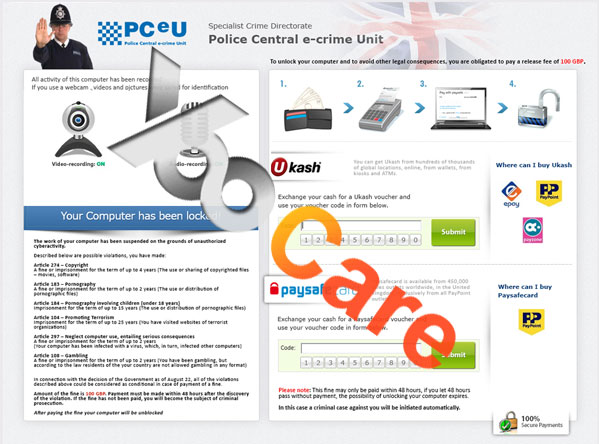
This Ukash virus is one of the largest ransomware viruses in the world, with several versions in circulation, all tailored for the specific part of the world that they are spread. Each virus is custom made to appear to come from the target country’s law enforcement division, such as the FBI (United States), Polizia di Stato (Italy), Metropolitan Police (United Kingdom), etc. There is a version of the Ukash virus for virtually every region around the world. Each one requests that payment is made from Ukash voucher, and they do that to make it a seamless process for them. When computer users go to the local stores, they are required to use cash to load the cards and then use the transaction numbers on the cards to unlock PCs. It sends the money to the hacker’s bank and there is no way to reverse the transaction, as there is no buyer protection when using this method of payment.
Ukash Virus – In United Kingdom (UK Version):
Ukash Virus – In Australia (AU Version):
Ukash Virus – In Canada (CA Version)
It Seems That My Antivirus Is Useless To Remove Ukash Scam?
So, how does the Ukash virus make its way onto computers? Well, the hackers spread this virus through SPAM email blasts that contain the virus within the email attachments. This launches the virus right as the user opens the attachment. It begins with changing the system settings, blocking certain programs from working and setting itself as start-up process so the warning message is displayed right after the computer starts. The message has very believable graphics and the fact that all other functions on the computer are blocked will scare some users and convince them to quickly pay the $100 out of fear.
There is also another reason why many users will quickly pay the fine. The hackers like to hide the ransomware attack in files that are bundled with illegal downloads or file sharing sites. They will place the virus in the same download folders as popular music, videos, and program files. The users on these sites know that what they are doing is illegal and in violation of copyright law, which is one of the claims that the Ukash virus accuses you of doing. Many users will assume that they are in troubles for downloading pirated software and files, and quickly pay the fine in order to avoid additional fines and further criminal charges.
In fact, when you get infected by such Ukash virus ransomware, antivirus is not just useless, but entirely paralyzed. The reason is that, when the virus accesses into your computer, it will do whatever it can to control the system then disable all the legit programs. So the antivirus will be blocked to militate. Basically, you can’t do anything you want if your computer has been attacked by such virus unless you remove it completely.
Symptoms of Ukash Virus And Related Chaos
A. Constant fake alerts will be displayed to threaten you to pay the ransom which is really annoying.
B. The original computer operating system can be gradually slow down and crashed.
C. It can lock up your computer making you impossible to operate the system properly.
D. It will steal your personal information for illegal usages, which may bring you great harm both financially and psychologically.
How Do I Unlock My Computer From Ukash Scam Efficiently?
Under no circumstances should computer users be sending money to anyone claiming to be the authorities. Authorities will never lock a computer and demand a certain amount of fine in order to unlock the PC. Many computer users who feel guilty of downloading pirated files and programs will mostly think this Ukash virus could be legit and make the payment out of fear, and in hope that it eliminates additional criminal charges as well as unlocking their computers. One should know that even after the payment is made, the computer will not be unlocked in time. Since your computer is locked by the Ukash virus, you have to delete the virus manually with professional computer knowledge. The only way to accomplish this is by deleting all of the Ukash virus files that are scattered in the system. This can be done by following the procedure below, and once completed we suggest that a virus scanning tool could be used on a regular basis to prevent future viruses and attacks. The instructions below will walk users through the steps necessary to delete the Ukash scam virus from the system. This manual removal will make sure that all of the files are deleted, removing the lock and preventing any further damage:
Step A: Restart your computer in safe mode. To do this, please press F8 key before the system is started like this: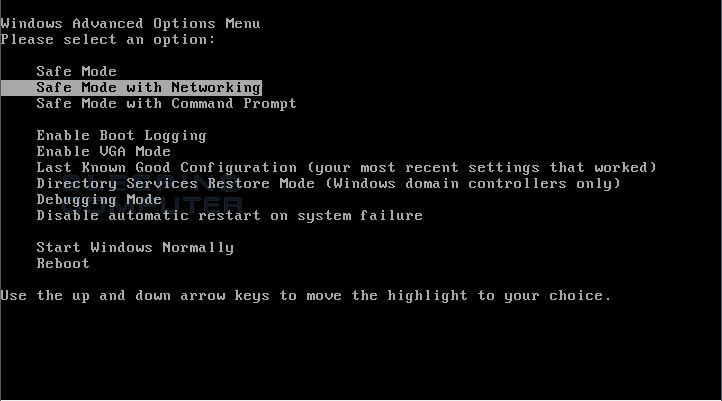
Step B: Press Ctrl+Alt+Del keys to open the Task manager to stop the progress of this Ukash virus. Because the name will be changed fast, it will be showed with different names.
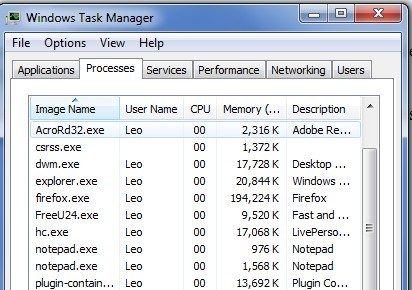
Step C: Delete all the files related to this Microsoft Windows Ukash virus.
Step D: Delete the Virus register entries created in computer system.
Nowadays lots of ransomware viruses use legal authorities’ names to scare computer users and deceive their money. The PCEU Ukash Virus is a typical one. Though Police Central e-crime Unit is an authorized organization, it has now become the proof to help cyber criminals deceive money. Since there is not a perfect anti-virus software that can fix this computer problem, the virus must be removed with expertise manually.
By the way: Manually remove Ukash Virus is a rather difficult process, especially when you are not a professional computer expert. Contact YooCare/YooSecurity online service 24/7 in time to get help instantly. This is the real fastest and safe way to remove the scam virus.
Video Guide On How To Remove This Ukash Scam From Registry Editor
Alternatively, you can remove Ukash Virus Scam to unlock computer or Mac by following the video guide directly on our website.
Android Phone Locked Out by Ukash Virus scam? Manual Removal Guide On Mobile Device
To remove the virus first please restart your phone to safe mode to unlock your cell phone from the block virus screen.
Note: “Safe Mode” on Phone starts up without loading any third-party add-ons and different devices have different ways to access safe mode.
For Samsung Galaxy S5, Samsung Galaxy S4, Samsung Galaxy Note: 1. Power down. 2. Turn on and repeatedly tap the soft-button for “Menu.”
For Samsung Galaxy S3, S2 and others: 1. Power down. 2. Turn on, then press and hold Volume Down (Galaxy S3 and others), Volume Up (HTC One, LG, ZTE and others), or Volume Down and Volume Up together (various Motorola devices) when the vendor’s logo appears.
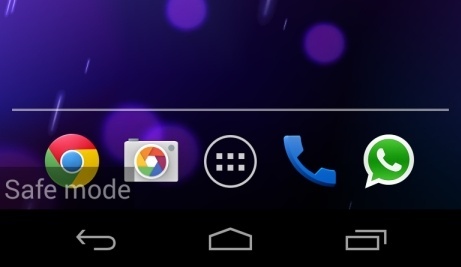
If you have managed to select Safe Mode, you will see the text “Safe Mode” at the bottom left corner of the screen. Next find the tricky virus that make you got request to pay £100 fine and get rid of it away.
In conclusion: As you can see, the Ukash virus is a really horrible virus which can finally destroy your PC/Mac Book/Mobile Device system. And please don’t consider auto delete method since there is no such anti-virus that can remove the virus completely. Do not download unauthorized “free” software either while having the risks to get scammed by another scam ware. This can only waste your time and may bring in more viruses. All the instructions above are prepared for those who have advanced computer knowledge and are familiar with this kind for virus. Besides, the above instructions only provide general concepts/basic steps for the removal. As for this virus, associating files and registry values can be named differently on different computers. Furthermore, as time goes by, Microsoft Windows Ukash virus may even update to another new variant. Hence, expertise is really needed during the manual removal of this Ukash ransomware to achieve a complete removal safely.
Note: If you have failed to remove Ukash virus after spending a lot of time, to avoid messing up your whole PC/Mac Book/Mobile Device, please consult YooSecurity certified professionals to remove it completely:

Published by Tony Shepherd & last updated on February 14, 2016 3:33 am








Leave a Reply
You must be logged in to post a comment.