
Attention: Famous ransomware Canadian Security Intelligence Service (CSIS) Ukash virus has its upgrade version recently with the name of Royal Canadian Mounted Police virus Ukash scam (RCMP virus), it either locked down your computer or locked browsers (Safari, Google Chrome) on Macbook pro. Your computer has been locked by Royal Canadian Mounted Police Ukash Virus Pay the fine? Ukash virus locked my files? The virus I have encountered is the word INTERPOL written all across the entire screen and that is all it will do in normal mode and safe mode. When I contracted the virus – the scam Computer Locked Up by Royal Canadian Mounted Police scam (RCMP Ukash Virus Removal) and I am told that you can help me get rid of it? This is mike, was on computer this Royal Canadian Mounted Police thing shows up on computer only it asks to go to marianos sumpermarket and get a ukash package. WTF? Then nothing is going to happen in 48 hours. should call RCMP? computer has been very slow lately and my search engines are less then accurate and reliable. Type in a search for medicare.gov and you wind up at a porno site! You can get more instructions on how to deal with it below.
Computer Locked by Royal Canadian Mounted Police Virus Ukash Scam and Have to Pay the Fine $100, $150 or $250 CAD? What Is RCMP Ukash Virus? How To Get Rid Of It From My Computer?
Royal Canadian Mounted Police Virus Ukash scam (aka RCMP Ukash virus), is the upgrade version of Canadian Security Intelligence Service (CSIS) Ukash virus. Currently, computer or Mac book pro user was blocked and told to pay 150 dollars to Ukash and RCMP will charge $150 for browser, so you pay fine if you see porn in Canada? Got RCMP lock thing on computer saying you need to pay 150 fine with URL http://rcmp.gc.ca.id481866003-5549111351.s2678.com/, is the Royal Canadian Mounted Police 150 dollar fine real? Why did your browser get blocked and RCMP message appeared? Browser has been locked by RCMP if fine isn’t paid? Well, you can learn details about the virus here. It is known as ransomware which hijack users’ computer to ask for a ransom or forfeit. In order to unlock their computer, the users have to do as the ransomware says. However, it does not only invade personal computers in Canada. It has different interface and language depending on the country of attack. Mostly, the ransomware pretends to be the national government offices. Once infected with Ukash RCMP virus all the icons or the files on your computer have been changed and the size properties have been hanged to and the wording on the files say “locked” and then the file name. Canadian Security Intelligence Service virus is the name of the malware or government scam in Canada. There’re various names of it in other country like Strathclyde Police Ukash Virus, Scotland Yards Ukash Virus, Guardia di Finanza Ransomware, Gendarmerie Nationale Ransomware, Police Central e-crime Unit (PCEU) Ransomware or ‘Die offizielle Mitteilung des Bundeskriminalamtes Trojan. Until recently, the infamous Ukash virus had only attacked computer systems located in Europe, but it spreads fast to Canada, America, Australia, like the one Royal Canadian Mounted Police virus Ukash scam. Not for a long time, it will be a huge threat for people all over the world. It brings lots of PC owners trouble and pains as well as money loss.
The RCMP Virus Ukash Scam is a computer virus that targets PC users in Canada and alerts them that they are in serious trouble because their computer has been linked to the distribution of pornography that involves children among additional charges. Once this virus is installed onto a computer it makes changes to the system that are necessary in order to prevent programs and files from being opened. The lock screen is displayed and the details of the charges as well as details on how to pay the fine are presented. This lock screen will not minimize and it will not close down. Even if the computer is manually shut down (because the start menu is not accessible) the Royal Canadian Mounted Police Virus Ukash Scam lock screen will be displayed as soon as the computer is started back up, even if this is done in safe mode. There is no escaping this.
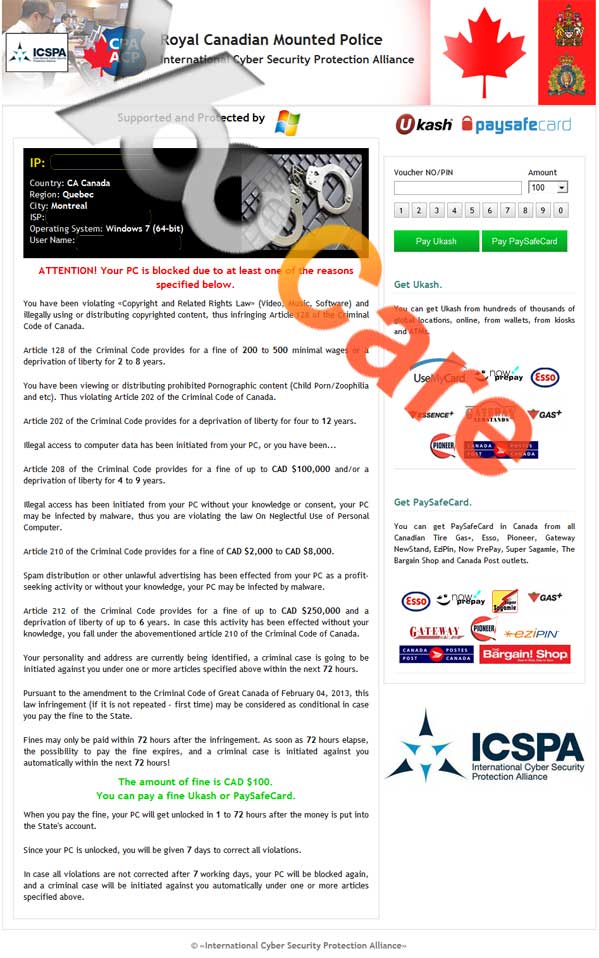
The lock screen lists off the charges and it also generates a “case number” as well as displaying the users IP address, and location to make it appear that the RCMP has their personal information. There is also a countdown timer that ticks off the time that the computer has been tracked. There is also a name listed under the personal details, making it seem like there is a RCMP agent assigned to the case. This is all done in order to scare the user into paying the $100, $150 or $250 CAD fine to remove RCMP virus. The only payment method that is accepted is Ukash or Paysafecard, which is a prepaid card to instantly transfer money electronically. There is a list of retailers that sell these cards, and once the user obtains one they enter in the transfer code into the lock screen and it automatically send the $100 or $$250 CAD to the computer hackers. This is how they easily extort money from unsuspecting computer users. You must remove Royal Canadian Mounted Police Virus Ukash Scam before it did further harm to your computer.
Note: To save your computer, Live Chat with YooSecurity Expert Now, or you can follow the manual removal guide below to get your problem fixed. (For advanced computer users)

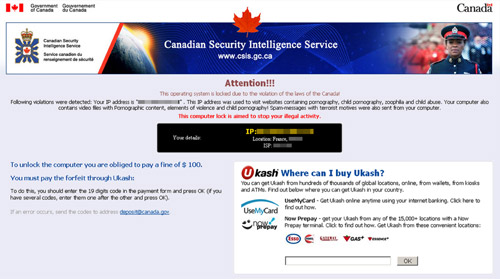
Here are two pictures showing how the ransomware works:
CSIS porn scam screenshot (Only locked your computer)
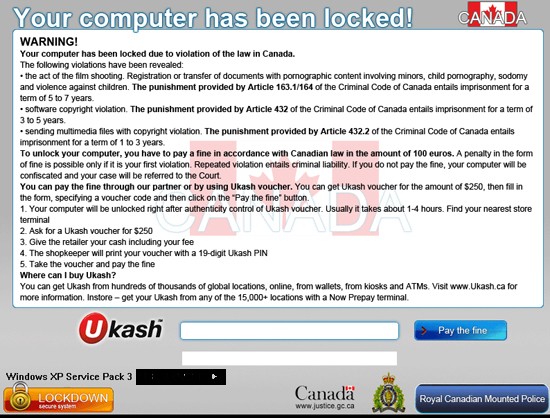
RCMP Ukash virus (This is a bigger one. Not only locked your computer but also locked your computer files)
Latest Royal Canadian Mounted Police Virus (aka RCMP virus)
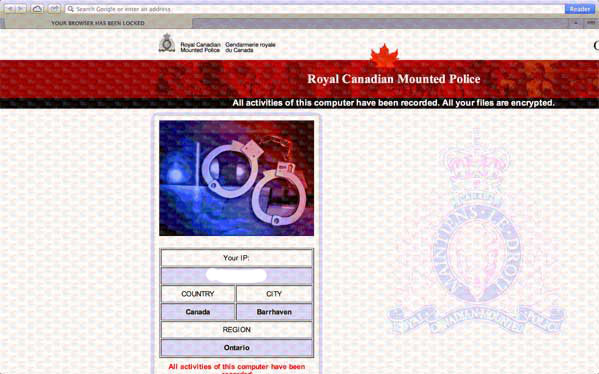
RCMP Your Browser Has Been Locked Virus Targets On Mac Book On July 2013
RCMP 250 Fine Locked Browser Virus – Unique opportunity to meet a Fuck Buddy
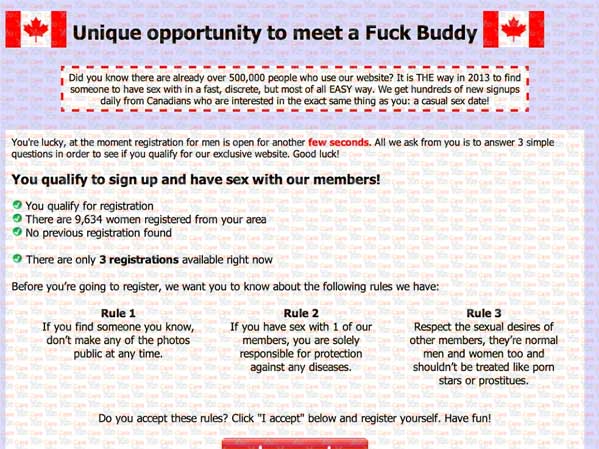
New Warning Screen of RCMP Virus Browser Locked On Mac For $150 CAD – Computer was frozen unless you paid a fine
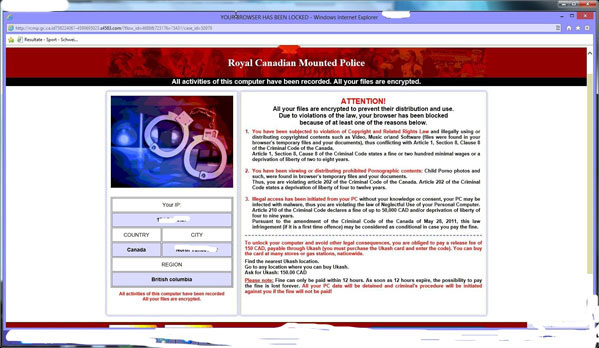
How Does Royal Canadian Mounted Police Virus Ukash Scam Lock Personal Computers?
Like other versions of the Ukash virus or ransomware, the Royal Canadian Mounted Police virus Ukash scam hijacks users’ computer and blocks all access to the Task Manager and to the infected computer’s desktop by pop-up alert claiming to be authorized by the Royal Canadian Mounted Police (in French also known as Service canadien du renseignement de sécurité), then tells you that your computer connecting network containing illegal pornographic. If the users don’t pay some money for penalty, the users will be prosecuted by related department.
In most situations, the threat alert information may like this: Attention! Your computer has been locked! Your computer has been locked due to violation of the law in Canada. Your activities such the film shooting, registration or transfer of documents with pornographic content involving minors, child pornography, sodomy and violence against children violate National Law. To unlock your computer from RCMP virus warning screen, you have to pay a fine in accordance with Canadian law in the amount of 100 euros. A penalty in the form of fine is possible only if it is your first violation. Repeated violation entails criminal liability. If you do not pay the fine, your computer will be confiscated and your case will be referred to the Court. And you are threatened to do those things: To pay the fine through our partner or by using Ukash voucher. You can get Ukash voucher for the amount of $250, then fill in the form, specifying a voucher code and then click on the “Pay the fine” button. Please never believe this kind of information, it’s totally fake and even if you pay for it, your computer will be still locked.
Best way to remove Royal Canadian Mounted Police Virus Ukash Scam (RCMP Virus Scam) efficiently
Since your computer is locked by such nasty virus, you have to delete the virus manually with professional computer knowledge. Canadian government locked my computer? Ukash virus removal in Canada? How to get unlock my files being locked by Ukash virus?
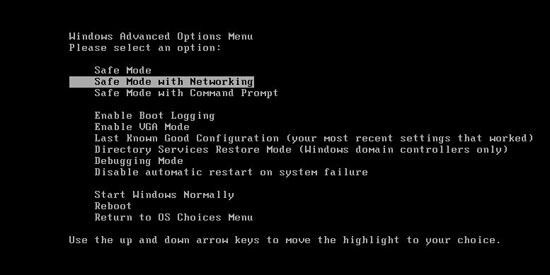
Step A: Restart your computer in safe mode. To do this, please press F8 key before the system is started like this:
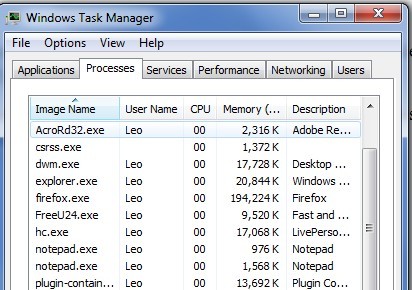
Step B: Press Ctrl+Alt+Del keys to open the Task manager to stop the progress of Royal Canadian Mounted Police Virus Ukash scam Ransomware. Because the name will be changed fast, it will be show with different name.
Step C: Delete all the files related to Royal Canadian Mounted Police Pay the fine Ransomware.
Step D: Delete RCMP Virus Ukash scam register entries created in computer system.
By the way: Manually remove Royal Canadian Mounted Police Ransomware is a rather difficult work, if you are not a professional computer expert. To avoid any mistakes damaging your system you are welcome to get help from YooCare experts 24/7 online in time. This is the real fastest and safe way to remove it.
Video Guide to Remove Royal Canadian Mounted Police Virus Ukash Scam (YouTube)
Alternatively, you can view this Royal Canadian Mounted Police Virus Ukash scam removal video guide directly on our website.
Royal Canadian Mounted Police Virus Ukash scam (Alias RCMP virus) is a nightmare that blocked your screen fully. You can follow the guides above to manually unlock your computer from that scam, next delete all associated files of the ransomware from your registry editor. But please take care when you start to do the work by yourself as the virus hides deep in your system, any mistakes will lead to damage your whole machine. And you understood no anti-spyware program can pick it up and trash this stupid thing, so manual removal is required, you know this is just for advanced users, the best way for most common computer users to save their computers is get professional help.
Recently, Royal Canadian Mounted Police Virus locked Mac OS x, and your browser has been blocked by Canada police virus, and browser locked with RCMP message, it states “RCMP your browser has been locked”. The RCMP IP address hoax infects Safari browser on Mac Book, you are required to pay 250 fine via Ukash to remove the virus from your browser. So in Canada online where to buy Ukash 250 $? No, please don’t pay for that as the internet security – Royal Canadian mounted police illegal pornography warning is a scam. Just remove RCMP virus and unlock your computer or browser right away.
Special tips: Spending a lot of time fixing your computer but in vain? Still be confused with the whole removal process? Why don’t you have a try of online support? Just click here for further help now:

Published by Tony Shepherd & last updated on March 4, 2015 8:00 am









Leave a Reply
You must be logged in to post a comment.